
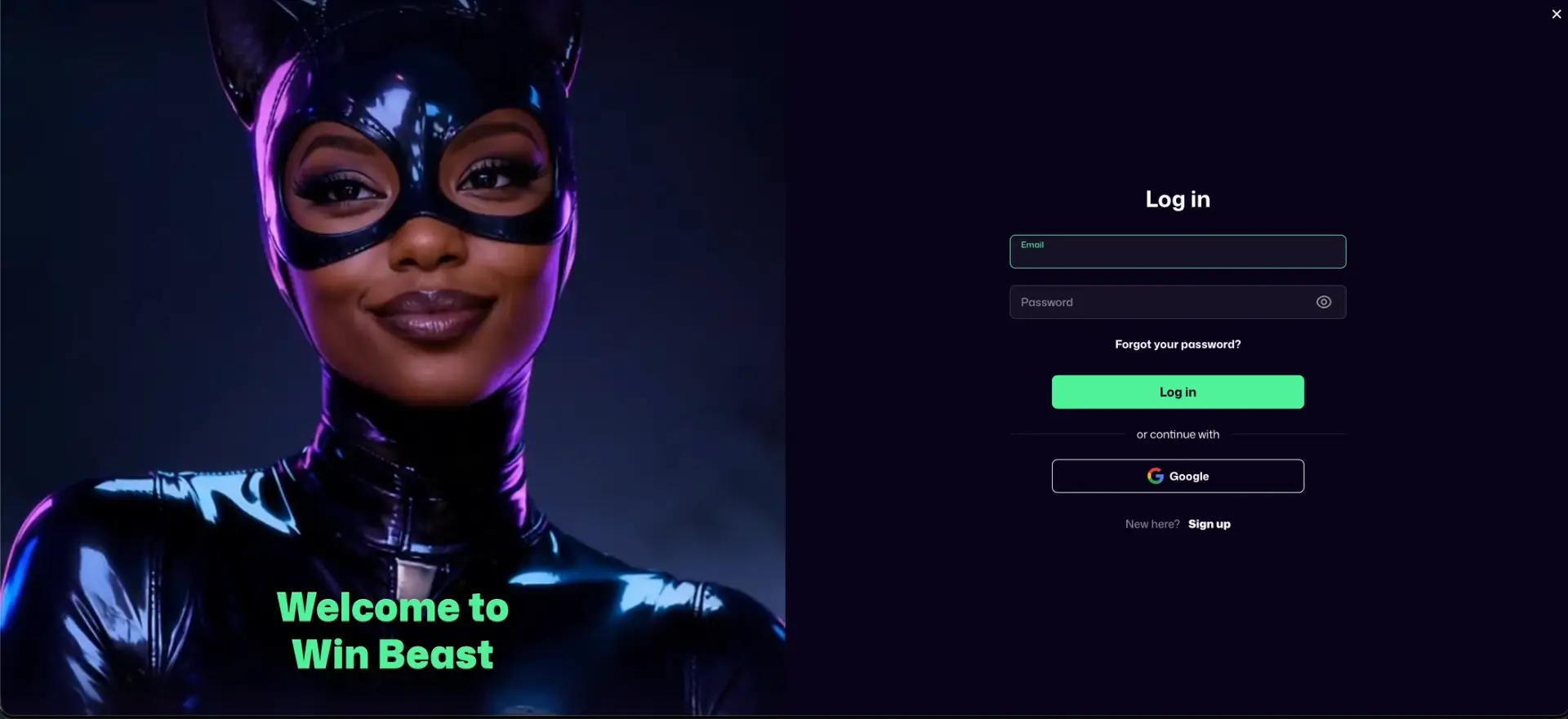
The WinBeast Casino login is done through the Log in button in the top-right corner of every page. It opens a pop-up where you sign in with the email and password used at registration, or with one click through Google if the account was created that way. The same form works in desktop and mobile browsers, as there is no separate app. If login fails, the Forgot your password? link under the password field sends a reset email. Persistent problems usually come from browser cache, a typo in the email address or a restricted account, and 24/7 live chat can resolve them.
The site runs over an encrypted HTTPS connection, and login details are only entered in the pop-up on the casino's own domain. The sections below cover step-by-step login, registration for new players, password recovery, mobile access, error fixes and the verification stage that follows the first deposit.
| Login essentials | Details |
|---|---|
| Where to log in | Log in button, top-right corner of every page |
| Login method | Email + password, or Continue with Google |
| Two-factor authentication | Not offered as a standard setting |
| Password reset | "Forgot your password?" link in the login pop-up |
| Device support | Desktop and mobile browsers (Chrome, Safari, Firefox, Edge) |
| Session security | HTTPS encryption; log out on shared devices |
| When verification appears | Before the first withdrawal, or on request |
| Currency | GBP for UK accounts |
| Support | 24/7 live chat, [email protected] |
How to log in to WinBeast Casino
Signing in takes a few seconds and follows the same steps on every device. The login form opens as a pop-up over the current page, so you stay on the game or promotion you were viewing.
Step-by-step login
For an account created with an email address, the steps are:
- Open winbeast.com in a browser.
- Click Log in in the top-right corner, next to the purple Sign up button.
- Enter the email address used at registration in the Email field.
- Type the password in the Password field. The eye icon shows the characters to check for typos.
- Click the green Log in button.
- The pop-up closes and the balance, cashier and account menu appear in the header.
Logging in with Google
Accounts opened with Google use the Continue with Google button under the form instead of the email and password fields. Choose the same Google account that was used at sign-up. Choosing a different one leads to a new registration rather than to the existing balance.
Create a WinBeast account if you don't have one
The login pop-up has a Sign up link for new players under the Google button ("New here? Sign up"). Registration takes about a minute, and the Welcome Pack of up to £5,000 + 500 FS + £650 free bet starts with the first deposit of £20 or more.
Quick registration flow
The sign-up form asks for six details in one screen:
- Email address.
- Password.
- Country dialling code and mobile number.
- Country of residence.
- Account currency: choose GBP for a UK account.
- Confirmation of being 18+ and acceptance of the Terms and Privacy Policy, then Sign up.
Secure WinBeast login practices
Because WinBeast does not offer two-factor authentication as a standard setting, the password and the email account behind it carry most of the security. A few habits protect the balance:
- Use a unique password of 12 or more characters that is not used on any other site.
- Secure the linked email or Google account with two-factor authentication, since password resets go through it.
- Type winbeast.com directly or use a bookmark, rather than following login links from messages.
- Log out after playing on a shared or public device, and do not let the browser save the password there.
- Contact support straight away if the balance or transaction history shows activity you don't recognise.
WinBeast password recovery
A forgotten password is reset by email in a couple of minutes. The account balance, bonuses and verification status are not affected.
Reset steps
Password recovery starts from the same pop-up used for logging in:
- Click Log in in the top-right corner.
- Click Forgot your password? under the password field.
- Enter the registered email address and submit.
- Open the reset email, checking the spam folder if it is not in the inbox within a few minutes.
- Follow the link and set a new password.
- Return to the site and log in with the new password.
Accounts created through Google have no separate WinBeast password. In that case, access is restored by recovering the Google account itself.
WinBeast mobile login
On phones and tablets, WinBeast runs in the browser. The Log in button stays in the header and opens the same pop-up form. There is no app in the App Store or Google Play, so login pages promoted as a "WinBeast app download" do not belong to the casino.
Tips for mobile
A couple of browser settings make mobile login quicker:
- Add the site to the home screen (Safari: Share → Add to Home Screen; Chrome: menu → Add to Home screen) for one-tap access.
- Let the phone's password manager save the login on a personal device to avoid typing errors.
- If the pop-up does not open, rotate the screen or close other tabs to free memory, then reload.
Troubleshooting common WinBeast login errors
Most login problems at WinBeast fall into four groups. Each has a quick fix that can be tried before contacting support.
Incorrect credentials
"Invalid email or password" usually means a typo, a different email address than the one registered, or an account that was opened with Google. Use the eye icon to check the password, try any other email addresses you use, try the Google button, or reset the password through Forgot your password?.
Browser or cache issues
If the pop-up does not respond, or the page reloads to the logged-out state after submitting, stored browser data or an extension is usually the cause.
- Clear cache and cookies for winbeast.com and reload.
- Disable ad blockers and script-blocking extensions for the site.
- Try a private window or another browser, such as Chrome, Safari, Firefox or Edge.
Reset email not arriving
WinBeast does not use two-factor codes, so the most common verification-type issue is a missing password reset email. Check the spam and promotions folders, add the casino's address to contacts and request the email again after a few minutes. If it still does not arrive, live chat can confirm which address is registered.
Account blocked or restricted
An account can be suspended after several failed login attempts, during a verification check, after a cool-off or self-exclusion request, or because of a breach of the terms. Login is then refused, or the account opens without access to the cashier. Live chat or an email to [email protected] explains the reason and what is needed to restore access.
What you can access after WinBeast login
Once signed in, the header shows the balance and cashier, and the account menu opens the main personal sections:
- Cashier: deposits from £20 and withdrawals to card, bank transfer, Revolut or crypto.
- Bonuses: active bonuses, wagering progress and personal offers.
- Promo field: where codes such as BOOST1, MODE3, FIERCE5, SAVAGE6 and FORTUNE are entered.
- Loyalty progress: current level and comp points towards the next reward.
- Transaction history: deposits, withdrawals and their status.
- Profile and verification: personal details and document uploads.
- Sportsbook: bet slip, open bets and settled bets under My Bets.
WinBeast account verification (KYC)
Logging in and depositing do not require documents, but verification has to be completed before the first withdrawal, and it can also be requested at any time. Uploading the documents straight after the first deposit avoids delays later. The usual set is:
- Photo ID: passport, driving licence or national ID card.
- Proof of address dated within three months: a utility bill or bank statement.
- A selfie, sometimes holding the ID.
- Proof of payment method: a card photo with the middle digits hidden, or a wallet or bank statement.
The name and address in the profile must match the documents exactly. Payment methods must be in the account holder's own name.
WinBeast Casino login FAQ
Answers to the most frequent questions about signing in to WinBeast.
Where is the WinBeast Casino login button?
In the top-right corner of every page, to the left of the Sign up button. It opens a login pop-up.
Can I log in to WinBeast with Google?
Yes, if the account was created with Google. Use Continue with Google in the login pop-up and choose the same Google account.
What should I do if I forgot my WinBeast password?
Click Forgot your password? in the login pop-up, enter the registered email and follow the reset link sent by email.
Does WinBeast have two-factor authentication?
It is not offered as a standard setting. Securing the linked email or Google account with two-factor authentication protects password resets.
Is there a WinBeast app for login?
No. Login works in any mobile browser, and the site can be added to the home screen as a shortcut.
Why is my WinBeast account blocked?
Common reasons are repeated failed logins, a pending verification check, a self-exclusion or cool-off request, or a terms breach. Live chat confirms the cause.
Do I need to verify my account to log in?
No. Verification is needed before the first withdrawal, not for logging in or depositing.
Updated 18 October 2026.